
Openserve fibre coverage map
Openserve runs the largest open-access fibre footprint in South Africa - over 151 000 km of cable, 2.4 million homes passed and brilliant address-level mapping. Check coverage at any street address in seconds.


Openserve fibre coverage
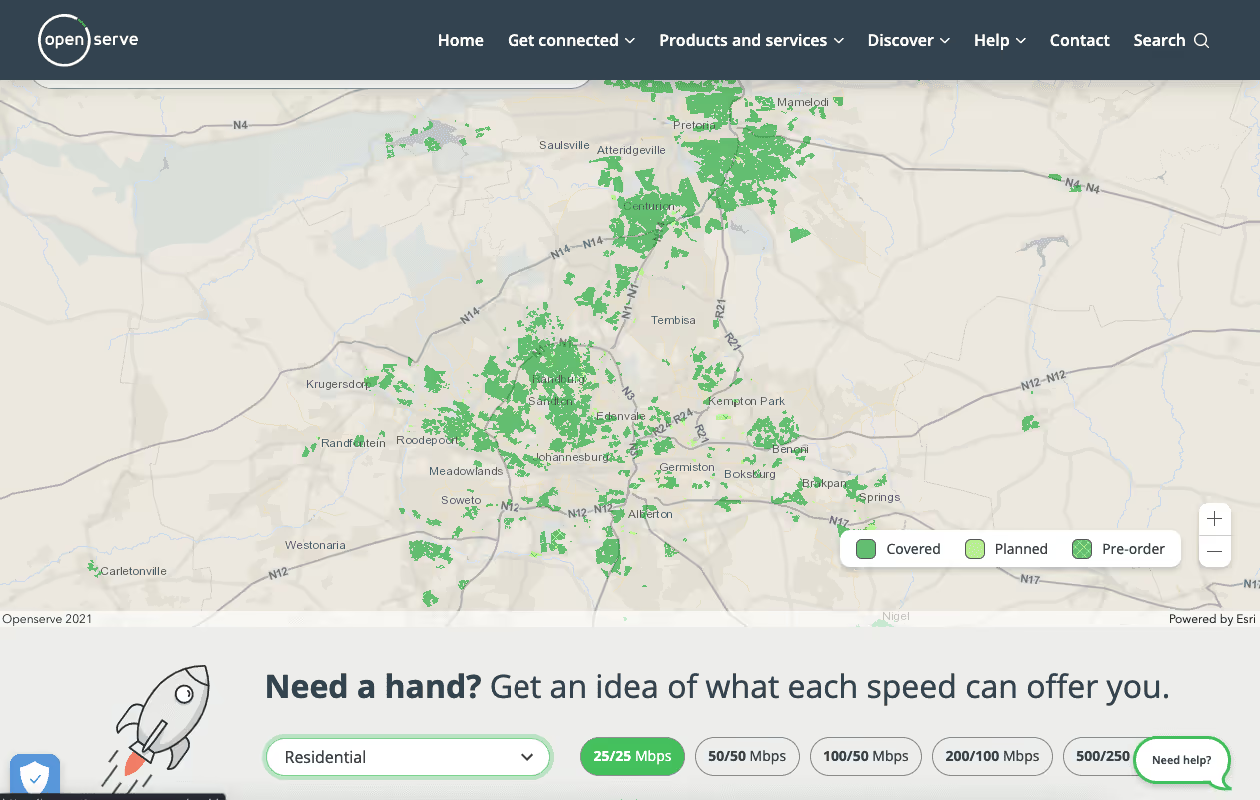
Openserve provides one of the most user-friendly fibre coverage maps in the country. It works a bit like Google Maps - you can see suburbs that are already live, areas in the build pipeline and zones where you can pre-order. And remember: when we say Openserve, we mean Telkom. That might trigger old associations for some South Africans, but Openserve has matured into the most extensive and consistently-rated fibre network in SA.
Why Openserve's map stands out
Most network operators have basic coverage tools. Openserve's is genuinely useful - and fast.
Address-level search
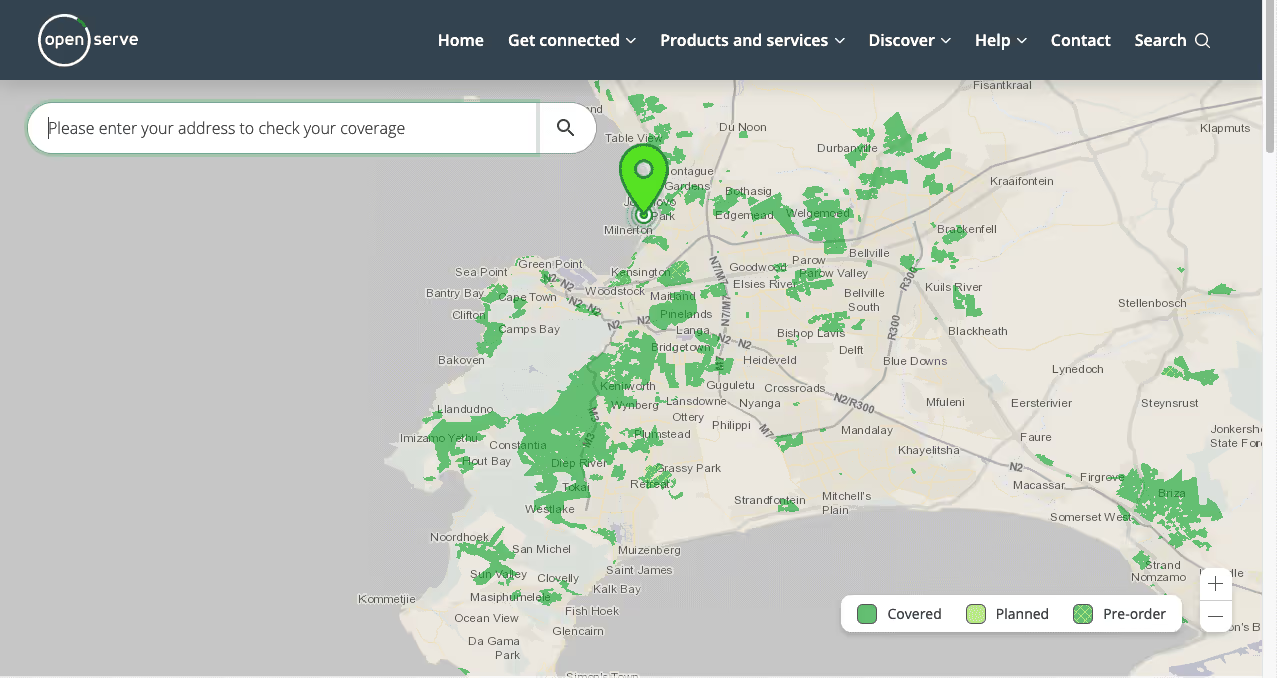
Type any street address and the Openserve map drops a pin showing exactly which fibre status applies - live, planned or pre-order.
Live, planned & pre-order layers
Toggle between active fibre coverage, areas in the build pipeline and zones where you can pre-order before the lines go live.
Business vs residential filters
Switch between residential FTTH and business-grade fibre product overlays - handy if you're comparing what's available for a home vs an office.
Speed-tier visibility
See which line speeds (up to 500 Mbps) are available at the address, so you can match the right Openserve package before you order.

Openserve coverage in Cape Town
Openserve has widespread fibre coverage across Cape Town's Southern, Atlantic and City Bowl suburbs. Constantia, Camps Bay, Pinelands and Edgemead are all well covered - and most of the more recently developed pockets either have lit-up Openserve fibre or are in the pre-order phase.
If you're looking for fibre in Cape Town, Openserve is almost always the first network to check - purely because of how broad the footprint is.
How to check your coverage
Open the Openserve coverage tool
Click through to the official Openserve map (or the Webafrica address-checker, which queries the same network data) and search the customer's exact street address.
Confirm fibre status
Look for one of three statuses on the result: 'Live' (you can order today), 'Planned' (build is scheduled) or 'Pre-Order' (sign up to lock in once the area lights up).
Pick an Openserve ISP
If the address is live, choose an ISP that runs on Openserve - Webafrica, Afrihost, RSAWeb, Cool Ideas or MWeb - and pick the right speed tier.
Openserve fibre deals
Openserve offers a wide range of fibre packages to suit every household - from an entry-level Web Connect line at R307 right up to 1000/500 Mbps from R997. Check the latest live prices and freebies on our Openserve deals page.
What a coverage result actually tells you
A green tick on a coverage checker is less definitive than it looks. When Openserve says it covers your address, it means the infrastructure runs close enough that you could be connected - not that a cable already reaches your wall, and not that you can be live this week.
Nationally the gap is substantial. South African fibre networks pass roughly 5.4 million homes, about 28% of households, while only around 17.4% of households have a fixed internet connection of any kind. Your address sits in one of three states, and they have very different timelines:
- Lit and previously connected. A prior occupant had a line and the terminal may still be mounted. Activation can take 24 to 72 hours with no technician visit.
- Passed but never connected. The street has fibre; your property needs a drop cable run. This is the standard case and where published install timelines apply.
- Not passed. No usable infrastructure nearby. No ISP can sell you a line here, whatever a city-level map suggests.
Coverage tools rarely distinguish clearly between the first two, which is why an address can show available and still take three weeks. Ask the question explicitly when you order.
An Openserve-specific nuance: coverage may be for the standard Openserve range or for Openserve Web Connect, an entry-level product with lower speeds and its own pricing. Both show as Openserve on most checkers, so confirm which one applies before comparing packages.
Why the map stops where it does
Openserve coverage follows build economics rather than suburb boundaries, which is why a map can look arbitrary - one side of a road covered, the other not.
Density and civil cost decide the route
Operators build where the cost of trenching is justified by likely sign-ups. Homes per kilometre of trench, ground conditions, whether existing ducting can be reused and expected take-up all feed that calculation. A street of large stands with long driveways can be uneconomic while a denser street behind it is straightforward. Openserve is the only network with genuine national reach across all nine provinces, so it is frequently the sole option outside the major metros.
Municipal wayleaves gate the whole thing
Before digging in a public road an operator needs a wayleave from the municipality. Industry submissions to the regulator have put typical approval times at six to twelve months, with costs from a few thousand rand into the hundreds of thousands. Where a build stops abruptly mid-suburb, an unresolved permit is often the reason rather than a commercial decision. Our coverage of why municipalities are fibre's biggest bottleneck goes into the detail.
Complexes need the body corporate to agree
In estates and sectional-title schemes the operator needs permission before installing common-area infrastructure. One unresponsive trustee can hold up an entire block. If coverage tools say yes but nothing progresses, ask your managing agent whether an agreement with Openserve is actually in place.
Getting a reliable answer from a coverage check
Coverage databases are matched on text strings and are fussier than they should be. A few habits help.
- Always use the exact street address. Suburb-level checks are close to useless, because coverage genuinely changes street by street.
- Try format variations. If "12A Main Road" returns nothing, try "12 Main Road", "Unit 12" and the complex name. False negatives from formatting are common.
- Check both the network tool and an ISP tool. They pull from different databases that update at different times, so one can show coverage the other has not loaded.
- Treat "coming soon" as unscheduled. It means the area is on a roadmap, not that a date exists. Register interest - operators genuinely use demand to prioritise build order - but do not plan around it.
- If tools disagree, ask for a manual feasibility check. An ISP reselling Openserve can query the operator directly and tell you which of the three states your address is in.
Covered - so what should you buy?
Confirming coverage is step one. Choosing well is step two, and the mistakes people make here cost more than picking the wrong network would.
Compare the price after the promo, not the headline
Most South African fibre packages advertise a promotional rate lasting two to four months, then step up to a standard rate. A package advertised lower can easily cost more over twelve months than one advertised higher with no promotional expiry. Work out the year-one total before comparing.
Prioritise upload if anyone works from home
A single video call uses roughly 3-4 Mbps upstream. Two adults on separate calls plus a cloud backup will saturate a 10 Mbps upload while the download sits almost unused. A symmetric line at a lower speed consistently beats a faster asymmetric one for a working household - see our guide to choosing fibre for working from home.
Check what leaving costs before you sign
Exit terms differ more between ISPs than monthly prices do. Some charge a cancellation fee only in the first six months; others charge it whenever you leave; others ask you to commit to a fixed initial term. If your living situation might change within the year, this matters more than the monthly rate.
Once you know Openserve reaches you, compare the ISPs reselling it on our Openserve deals page, or see the full ISP ranking for how the providers score on support, speed and value.