
Should You Pay for Gigabit Fibre in 2026? An Honest Buyer's Guide
Gigabit lines are cheaper than ever, but the bottleneck has shifted from the cable to your router, your devices and your provider. Here's when 1 Gbps is worth it - and when it isn't.

In this article(6)
What changed: gigabit got cheap
Gigabit fibre used to be a small-business product priced well above R2 000/month. Today the cheapest 1 000 Mbps line we track is R699/month (Vumatel, asymmetrical), and the typical gigabit deal across every network we track lands around R1 547/month.
That's a real shift, and it's tempting to buy the biggest number on the page. But "more speed" only translates to "better internet" if something in your home actually uses it - and for most households, the answer is honestly no.
Worth knowing before you compare quotes: "gigabit" doesn't mean the same thing on every network. Some 1Gbps-branded tiers are symmetrical and some aren't - see our full price and spec comparison across Openserve, Vumatel, Frogfoot and Octotel for the current numbers.
| Metric | Value | Detail |
|---|---|---|
| Cheapest gigabit line | R699 | Vumatel, asymmetrical |
| Typical (median) gigabit price | R1 547 | Across 68 live gigabit deals |
| Symmetrical gigabit deals | 20 of 68 | Matched upload speed |
| Networks offering gigabit | 26 | Across every ISP we track |
Where the bottleneck moved to
Above 200 Mbps, the fibre line itself almost never becomes the limiting factor for normal home use. The bottleneck shifts to one (or several) of:
1. Your Wi-Fi
A typical Wi-Fi 5 router maxes out at 300–500 Mbps in real-world tests. Your phone or laptop's wireless card matters too - older devices simply can't do gigabit over Wi-Fi. To genuinely see 1 Gbps wirelessly you need Wi-Fi 6 (preferably 6E) hardware at both ends.
2. The websites and services you use
Netflix 4K streams at 25 Mbps. YouTube 4K at 20 Mbps. A Steam download saturates at whatever your line allows but most servers cap individual connections around 500 Mbps. If you spent five minutes adding up what your house actually pulls concurrently, you'd struggle to get past 300 Mbps even on a busy evening.
3. International peering
Pulling content from US or European servers is bottlenecked by SA's upstream peering, not your line. A gigabit line will usually pull 80–120 Mbps from a US-hosted CDN - same as a 200 Mbps line.
| Activity | Typical bandwidth needed |
|---|---|
| Netflix 4K stream | ~25 Mbps |
| YouTube 4K stream | ~20 Mbps |
| HD video call (Zoom/Teams) | ~3–8 Mbps |
| International CDN download (US/EU server) | ~80–120 Mbps, capped by SA peering, not your line |
| Local (SA-hosted) download or game update | Up to your full line speed |
When gigabit genuinely makes sense
There are real scenarios where gigabit pays for itself. Buy it if you tick at least one of these boxes:
- Large household, heavy concurrent use: 5+ people simultaneously streaming 4K, on video calls, gaming and downloading. The peak-load sums actually start hitting 400–600 Mbps.
- Professional uploads: photographer or videographer pushing 100+ GB of footage to cloud storage daily. Symmetric gigabit (Vumatel, MetroFibre) cuts upload time from hours to minutes.
- Home server / NAS / Plex: you self-host services and want external access without throttling.
- You're going to live there 2+ years: SA streaming services, cloud-gaming platforms and AI tools are pushing bandwidth up. Buying ahead of the curve is sometimes cheaper than upgrading later.
When 200 Mbps is the smarter buy
Pick a 200 Mbps tier instead of gigabit if your household profile looks anything like:
- 2–4 people, normal mix of streaming, browsing and remote work
- One or two 4K TVs, plus phones and laptops
- No professional upload workloads
- You want to save R400–R600/month for something else
You'll genuinely never notice the difference between 200 Mbps and 1 Gbps for Netflix, YouTube, video calls, online gaming, file downloads or browsing. The line won't ever be the slow part of your day.
Gigabit or 200 Mbps? Work it out in three questions
Most SA households land on 200 Mbps by the second question.
- Q1
Do 5 or more people in your home stream, call and download at the same time on a normal evening?
- Yes → Peak concurrent load can genuinely hit 400–600 Mbps - gigabit is worth considering.
- No, 2-4 people with a normal mix of use → 200 Mbps easily covers this - and typically saves around R458/month versus the median gigabit price.
- Q2
Do you regularly upload large files - professional photo/video work, or a home server open to the internet?
- Yes → A symmetric gigabit line cuts upload time from hours to minutes - a genuine reason to pay for it.
- No → Uploads aren't a factor - keep evaluating on download needs alone.
- Q3
Do you have (or are you willing to buy) Wi-Fi 6/6E hardware end-to-end to actually use gigabit speeds wirelessly?
- Yes → You'll actually see the speed you're paying for - gigabit makes sense if the above also apply.
- No → You'd be paying for headroom your Wi-Fi can't deliver - fix the hardware first, or stick to 200 Mbps.
The router trap - don't pay for gigabit on Wi-Fi 5
If you're seriously looking at gigabit, audit your hardware first. The free routers bundled with most ISP packages are entry-level Wi-Fi 6 - fine for 200 Mbps, but they'll only push 400–600 Mbps over Wi-Fi at close range, dropping further as you move away.
Real gigabit Wi-Fi needs:
- A Wi-Fi 6 or 6E router with at least one 2.5 Gbps Ethernet port (R3 000+)
- Cat 6 Ethernet cable for any wired devices that need to use the full pipe
- Wi-Fi 6/6E phones, laptops or desktops on the receiving end
The router most ISPs bundle vs what gigabit Wi-Fi actually needs
A free entry-level router is fine at 200 Mbps. It becomes the bottleneck the moment you pay for gigabit.
| Dimension | Typical bundled router | What gigabit Wi-Fi needs |
|---|---|---|
| Wi-Fi standard | Entry-level Wi-Fi 6 | Wi-Fi 6 or 6E throughout |
| Real-world wireless throughput | 400–600 Mbps at close range, less further away | Needs to sustain close to 1 000 Mbps |
| Wired ports | Standard 1 Gbps Ethernet | At least one 2.5 Gbps Ethernet port |
| Cost | Included with most plans | R3 000+ for router hardware alone |
Add it up: a R1 547/month gigabit line plus R3 000 in router upgrades is a real first-year jump over a 200 Mbps line that uses your existing kit. Make sure you actually need it.
The honest verdict
Gigabit fibre in 2026 is a great deal compared to two years ago, but it's still a niche product. Most SA households are better served by 100–200 Mbps- you'll get identical real-world performance for streaming, calls and gaming, and pocket the difference.
Buy gigabit if you're a heavy concurrent household, a content creator, or you actively want to future-proof for two-plus years. Buy 200 Mbps if you're anywhere else on the spectrum.
When in doubt, start at 200 Mbps. The no-contract billing across all major SA ISPs means you can upgrade to gigabit anytime if you genuinely hit the ceiling.
Help someone else pick the right fibre
Now go and compare the deals
Prices below come from our own deal tracking, checked on 19 October 2026.
What each package actually costs per megabit, not just per month.
See the dealsRanked by price across every ISP and network we track.
See the dealsEvery package at 1 Gbps and above, with the cheapest route to that speed.
See the dealsRelated insights
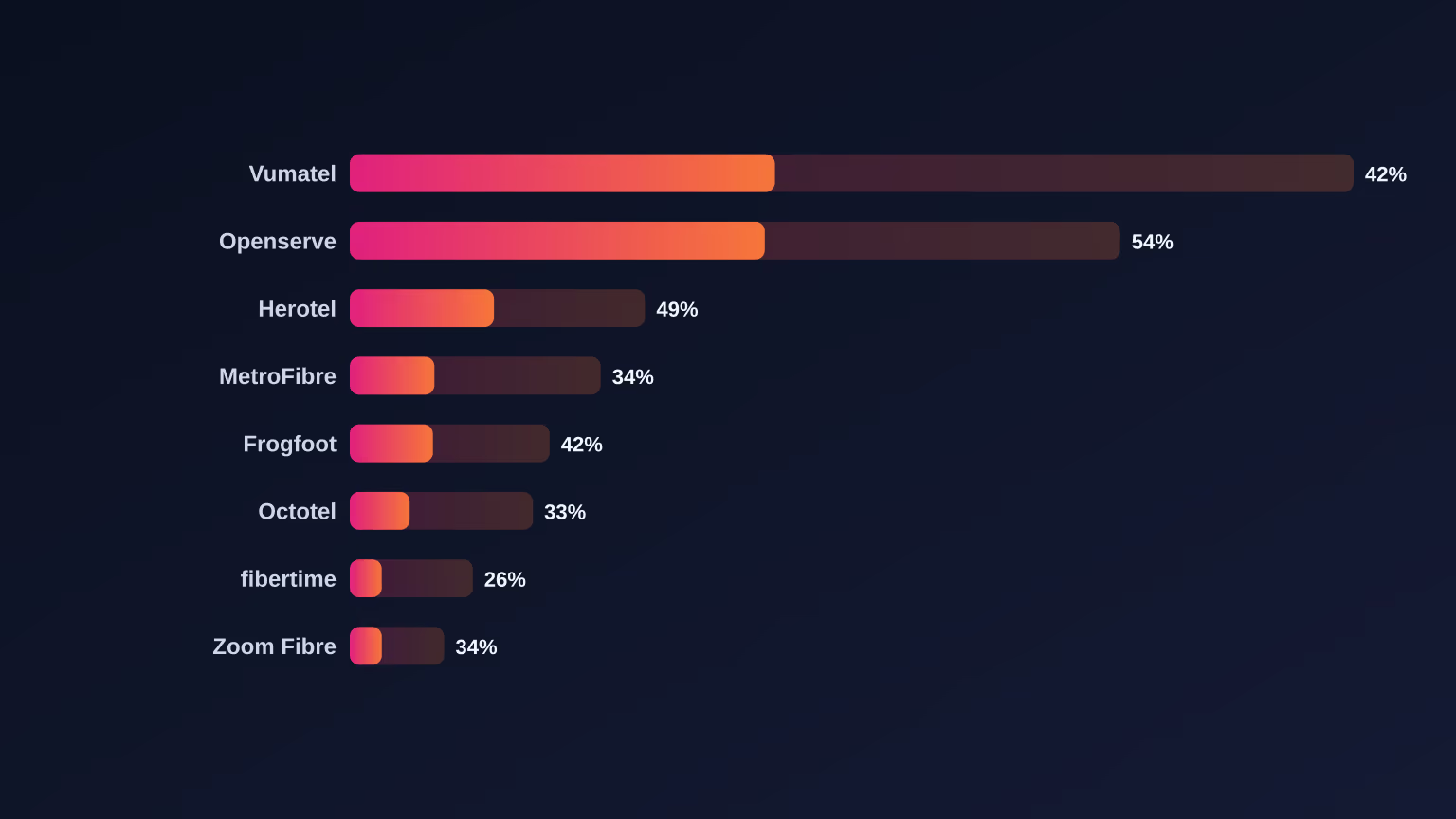
The Fibre Uptake Gap: Which SA Networks Actually Turn Coverage Into Customers
Read article
Openserve Launched Its Own ISP. Should You Switch, or Stick With a Reseller?
Read article
The April 2026 Openserve Price Increase: What Changed and What It Means for Your Bill
Read article
Did Webafrica Buy MWeb? What It Means for Your Fibre
Read article
MWeb vs Afrihost 2026: Which SA Fibre ISP Is Better?
Read article
Is MWeb Fibre Worth It in 2026? An Honest Review
Read article
MWeb LTE vs Fibre 2026: Which Should You Get?
Read article
MWeb's Free-to-Use Router Explained: What You Actually Get
Read article
MWeb Uncapped & Unshaped Fibre Explained
Read article
Cheapest MWeb Fibre Under R500/Month 2026
Read article
Is Uncapped Fibre Really Unlimited? Fair Use, Shaping & Throttling in SA (2026)
Read article
Webafrica vs Afrihost vs MWeb 2026: Which SA Fibre ISP Actually Wins
Read article
Best Fibre for Working From Home in SA: Why Upload Speed Decides (2026)
Read article
Vuma Key vs Fibertime: SA's Prepaid Fibre Showdown (2026)
Read article
Best 5G Home Internet in South Africa: Rain vs Vodacom vs MTN (2026)
Read article
Best Wi-Fi Router for Fibre in South Africa (2026)
Read article
Fibre Installation in South Africa: What to Expect (Step by Step)
Read article
How to Switch Fibre Providers Without Losing Connection (South Africa)
Read article
Prepaid & Township Fibre Explained: Vuma Key, Fibertime & Pay-As-You-Go
Read article
Fibre vs LTE vs 5G in South Africa: Which Should You Choose?
Read article
How Much Internet Speed Do You Really Need? (South Africa, 2026)
Read article
Why Is My Fibre Slow? How to Fix Slow Wi-Fi at Home (South Africa)
Read article
Is Starlink Legal in South Africa? The 2026 Status, Explained
Read article
Vodacom's R800m Top-Up: What the Herotel Deal Means for Maziv, Vumatel and SA Fibre
Read article
Vuma Core vs Vuma Reach: Which Vumatel Fibre Product Is Right for Your Home?
Read article
The April 2026 Vumatel Price Change: What Actually Happened and What It Means for Your Bill
Read article
Vumatel Hits One Million Subscribers: What This Milestone Actually Means for South African Fibre
Read article
The Maziv Merger Explained: How Vumatel, Vodacom Fibre, DFA and Herotel Came Together
Read article
Vumatel's Herotel Acquisition: Why a Wholesale Network Bought a Retail ISP
Read article
How Vumatel's Open-Access Model Created 75+ ISPs and Shaped South African Fibre
Read article
The State of Fibre Internet in South Africa 2026
Read article
The Fastest Fibre Countries in the World 2026: Speedtest Global Index
Read article
Webafrica Vumatel 100/100 Review: Is It Still the Sweet Spot in 2026?
Read article
Openserve vs Vumatel in 2026: Which Network Should You Actually Pick?
Read article